Pseudonymization, Context Engineering, Word documents: Three Years Building an AI Legal Assistant

Introduction
This article is a tech founder’s reflection on three years spent building Copilex, an AI assistant for lawyers.
My goal here is to share some of the technical challenges we faced, in a context of rapid progress in the foundation model’s capabilities. I’ll also be candid about choices I’d make differently in hindsight. Hopefully, if you’re getting started building AI products, these lessons will prove useful even now.
For more technical deep dives, I’ll be writing separate posts, so make sure to subscribe to this blog to get notified when they’re published.
A bit of history
What if AI could review your contracts or help you understand your rights? This is a question that first started to interest me way back in 2015, when I was working on NLP projects at Heuritech. My colleagues and I considered building something for the legal domain, but in reality the technology was way too limited: the best you could do was to classify documents into a handful of categories (e.g., Contract, Correspondence, Memo, etc.), but you couldn’t really “reason” about what was in them.
Fast-forward to late 2022, shortly after ChatGPT was released, I met my co-founder Paul Lefeuvre, a lawyer and the CEO of Copilex. We started to discuss the impact it could have on the legal domain. That ChatGPT moment was a clear unlock for what was now possible, but there were also a lot of challenges.
Building Sentinel, a Pseudonymization System for the Legal Domain
One early challenge we faced was not so much about the technology itself, but how it was perceived by lawyers. Confidentiality is paramount to the legal profession, and using ChatGPT at the time meant sending your sensitive data to servers outside of Europe, where it would be kept for a while and possibly used for training new models. This was a big no-no for lawyers, and we had to find a way to address this concern.
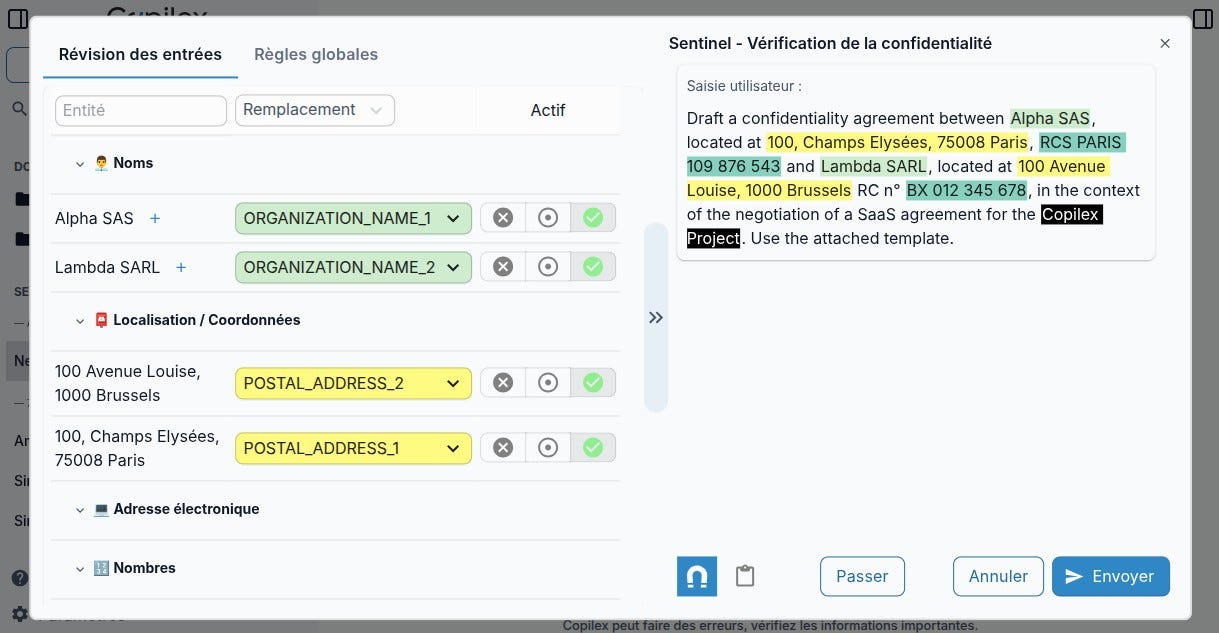
Our answer was to build Sentinel, a system that would automatically replace any sensitive information before it was sent to ChatGPT, or any other external Large Language Model (LLM). The idea was simple: if the data leaving our servers contains no identifiable information, then confidentiality is preserved regardless of what happens downstream. And this was possible because LLMs do not need to know specific people and companies’ names to operate: all mentions of “John Smith” may be replaced by “[PERSON_NAME_1]” and “Acme Corp” by “[ORGANIZATION_NAME_1]” without losing any necessary information for legal work. The response of the LLM would not be affected by this replacement, and we could simply replace the sensitive information back with the original, to get the final answer.
The need for a custom model
Anonymization or pseudonymization is not something new in the AI world, this is called PII (Personally Identifiable Information) detection. Generally, this is done using what is called a Named Entity Recognition (NER) model, which identifies and classifies entities (e.g., people, organizations, locations, dates, etc.) in a text.
The challenge was that, in the legal domain, what is considered “sensitive” would not completely match the standard classification of PII. For example, if your contract mentions a court name or public institution, this is often necessary information to know which jurisdiction and which laws apply, and thus should not be anonymized. But mentions of private corporations would almost always be sensitive, as those usually correspond to contract parties, plaintiffs, defendants, etc. A generic model detecting all types of “organizations” would simply not work in this domain.
Therefore, we had to make our own detailed ontology of entities encountered in legal documents, and define which ones would generally be sensitive and which ones would not. Then, we created datasets of annotated documents, and trained a model to perform the classification. This is the core of our Sentinel system.
One interesting strategy I used to speed this up is a data augmentation approach. First, we manually annotated a small but carefully curated “gold” dataset, a few hundred documents where every annotation was verified by hand. This is typically not enough to train a small model, which requires a lot more data before it really learns the patterns. What I did was fine-tune a LLM on this gold data: a much bigger model is able to learn quite a lot from even a small amount of data. It was good enough to generate new annotations (”silver” data) at scale. Finally, we used that silver data to train the smaller model, able to run locally without requiring GPU infrastructure, or at least without a big GPU. This was the model that would actually run in production, processing user requests in real time.
The Review Interface
Automatic detection was only half the problem. Users need to review what would be pseudonymized and adjust it before it is actually sent to the LLM. A lawyer might know that a particular company name is actually public knowledge in this context, or that a seemingly generic term is actually a confidential code name. We built an interface where users could see exactly what would be pseudonymized before sending, with the ability to override decisions on a case-by-case basis. That worked with two layers of rules, local rules applied only to this specific request, and global rules to always pseudonymize or never pseudonymize certain terms. This let users build up their preferences over time, reducing the friction of review while maintaining control.
Analyzing Long Legal Documents
With confidentiality addressed, we could focus on the core value proposition: helping lawyers analyze and draft documents. We built several workflows around search and drafting, but the most technically interesting and challenging work was in document analysis. Within document analysis, two modes emerged as particularly useful.
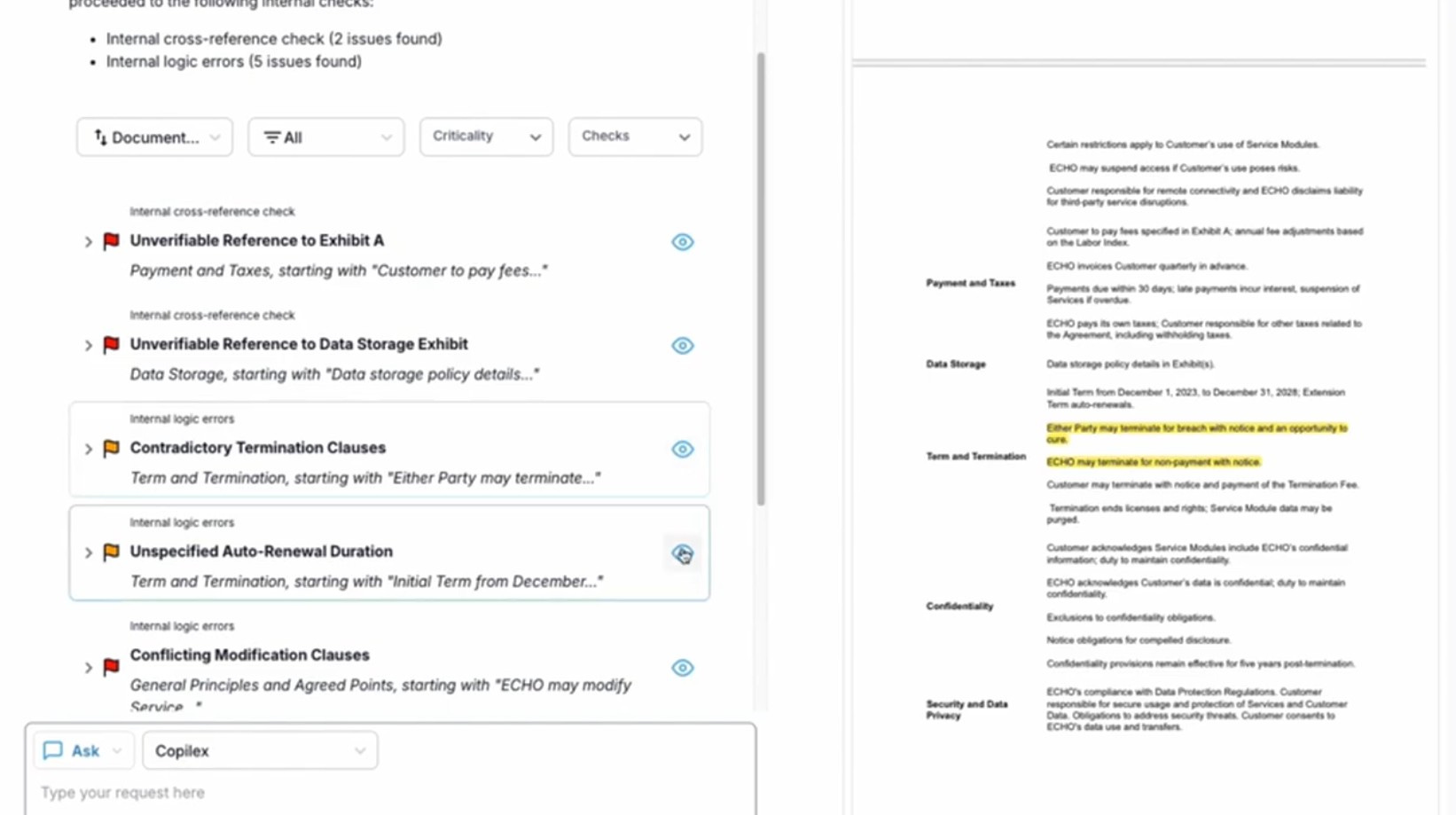
The first was a Sanity check on a single document: upload a contract, and the system would flag potential issues like missing clauses, ambiguous language, logical errors...
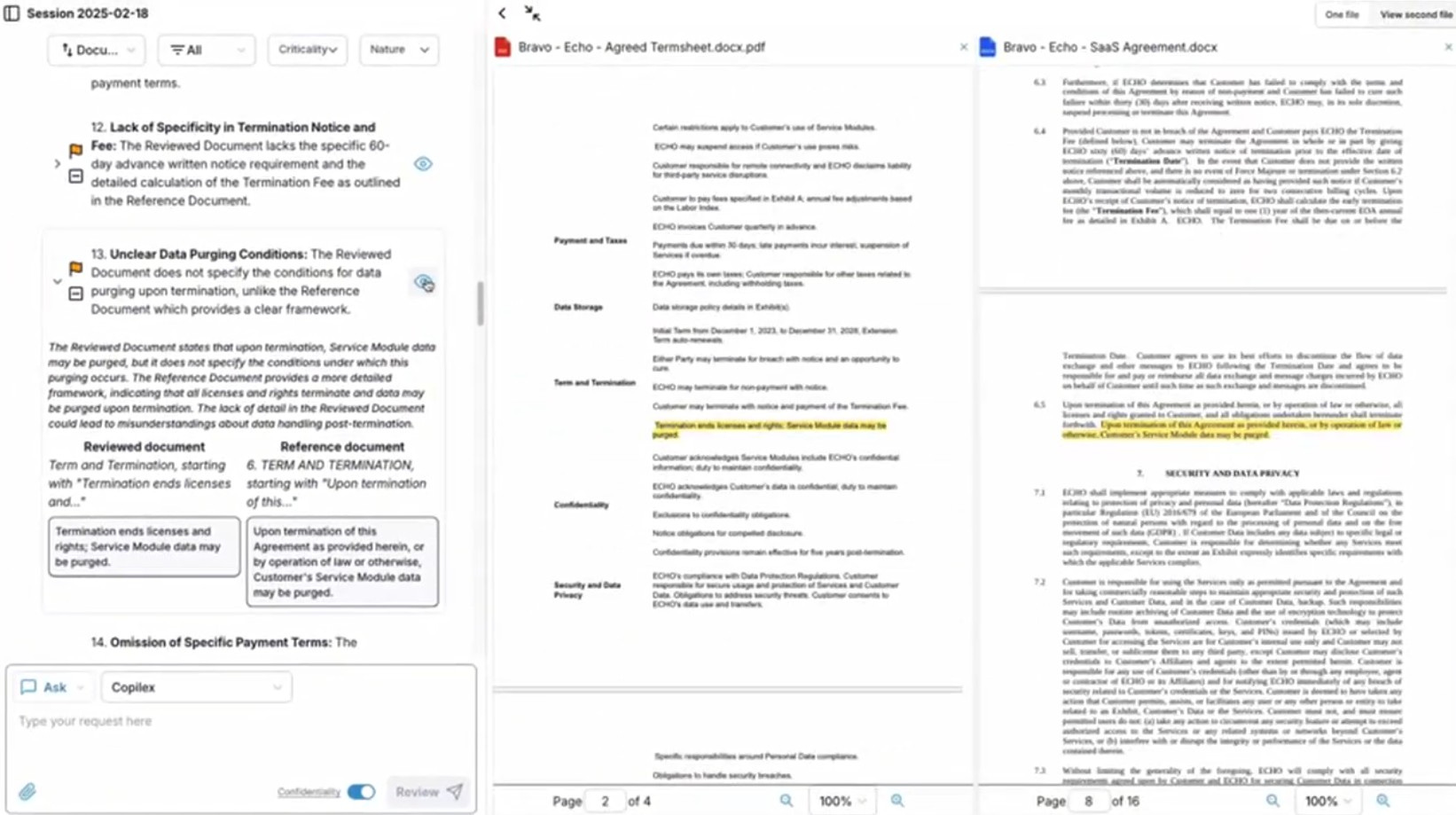
The second was Comparative analysis: take a contract and compare it against a reference document (internal guidelines, a standard template, or regulatory requirements) to identify discrepancies. That one was the more challenging: we are not only checking a single document against a predefined set of rules, but dynamically applying those from one document to another. This is worth discussing in a bit more detail.
Context Engineering for Legal Reasoning
A naive approach to comparative analysis would be to put the documents in a prompt, and ask the LLM to “compare those two documents section by section to identify all discrepancies”.
Contracts can run to dozens or even hundreds of pages. Circa 2023-2024, you simply couldn’t fit even a single long document into a prompt: the model’s context window, which limits how many tokens can be used at once, was at most a few thousand tokens. Even today, with much larger context windows available, cramming everything into one prompt isn’t necessarily the right approach: model attention tends to degrade over very long contexts, meaning that it will miss things or hallucinate, and costs scale with input size.
Another, less obvious limitation, had to do with the effective length of the generated output. This can be easily observed if you ask an LLM to produce a very long response, like “Write a 100000 words essay on what’s it like being an AI”, it will be longer than average but certainly not arbitrary long. This is due to the way the models are trained, and is not something that can be controlled by the user.
The concrete consequence of that limitation is that you always get a handful of issues regardless of the size of the document you are analyzing, be it 2 or 100 pages.
I needed a strategy to address both these limitations, which meant breaking down the documents and the analysis into manageable chunks, while preserving the relationships that matter for comparison.
Naively splitting the documents into fixed-size chunks doesn’t work well, so we worked on a more sophisticated approach that would preserve the structure of the document, i.e., articles, clauses, definitions, ...
Once I had this, the next step is to determine what is relevant to compare. Essentially, this is about pairing together the bits that cover the same topic. For example, if our reference document had guidelines about liability limitations, we’d find the corresponding liability clause in the contract being analyzed. This is done with a custom retrieval system combining vector search and good old BM25.
The Context Retrieval Layer
Even with good section matching, comparing two isolated sections will often fail in practice because some context is lacking. Legal provisions often reference other parts of the document, either implicitly by using defined terms (e.g. “Confidential Information”, “Data”, “Force majeure”, etc.), or explicitly by referring to other articles, clauses, or definitions (e.g., “as defined in Article 2”, “subject to the limitations in Section 5”, “notwithstanding the provisions of Clause 12”). Comparing a liability clause without all that relevant context could lead to completely incorrect analysis.
I solved this by adding a retrieval step that would pull in additional context when needed, with some upper bound on the size of that context. Before asking an LLM to compare two sections, we’d include not just the matched sections but also referenced articles, relevant definitions, and metadata about the document’s nature and structure. This gave the model enough context to reason correctly most of the time, without requiring the entire document in every prompt.
The architecture ended up looking like a pipeline: structure extraction, section matching, context augmentation, LLM-based comparisons, and a post-processing step to aggregate and de-duplicate the results. Interestingly, the LLM-based comparisons step was not really the hardest part, more like a cherry on top of a complex multi-layered cake. This illustrates why context engineering is key to getting good results out of LLMs.
This approach involves trade-offs between precision and speed / cost. Usually, the more (relevant) context you provide to the LLM, the more precise the results, but the slower and more expensive it becomes. I could make things even more sophisticated by letting an agent handle the retrieval step, deciding whether it needs to collect more information or not. I also experimented a bit with techniques like GraphRAG to have a more elaborate retrieval layer. But at the end of the day, this adds a lot of complexity, which means more risks of cascading failures.
Working with Word Documents
Honestly, I had not anticipated that work related to Word documents would take so much effort. From the outside, it seems like a solved problem: Word has been around for decades, there are countless libraries in all major programming languages for reading and writing .docx files. But when precision matters, when a misrendered footnote or incorrect section number could have legal consequences, the standard tools fall short.
Extracting Text Without Losing Anything
The first challenge was extraction. Lawyers work with documents where every detail matters: footnotes containing key definitions, margin comments from previous reviews, headers that establish which version you’re looking at, tables with carefully structured data. I needed to extract all of this faithfully, preserving the structure that gives these elements meaning.
I tried many tools and libraries, but surprisingly, none of them were able to extract everything correctly. For example, Pandoc would miscalculate section numbering compared to what Word actually renders (this information is not hard-coded in the document). This might seem like a minor issue, but incorrectly rendered reference numbers like “Section 3.2.1” instead of “Section 2.2.1” could produce false positives when checking for consistency in cross-references!
One early workaround involved setting up a dedicated Windows server running Microsoft Office to programmatically export documents as HTML, which I could then easily parse into text. This gave accurate rendering since it used Office itself, but it was brittle, slow, and a pain to maintain. I eventually abandoned it and forked an existing library called python-docx to properly handle the edge cases (e.g., footnotes, comments, headers, ...). The effort was worth it, as it unlocked our ability to efficiently perform replacements in Word documents, without breaking the formatting.
Modifying Documents While Preserving Format
Lawyers don’t just want to analyze documents, they want to edit them. Our AI assistant works with text, might suggest revisions (e.g., replace “[insert signature date here]” with the actual date), but those suggestions need to end up back in the original Word document, not in a plain text file!
This creates an interesting technical challenge of applying text changes back to the original XML structure that defines a .docx file. You can’t just do string replacement: for one, that string may occur multiple times in the document but only needs to be replaced at a specific location; moreover, a paragraph in Word might be split across multiple XML elements for formatting reasons, a comment anchors to a specific range that spans elements, tracked changes have their own complex representation.
I solved this by maintaining a mapping from XML nodes to line numbers in the extracted text. When the LLM suggests a change at line 47, we can trace that back to the specific XML elements that need modification, preserving all the surrounding formatting and metadata.
The In-App Document Editor
With extraction and modification working, I built an in-app document editor that enabled seamless collaboration between the user and the AI. A lawyer could upload a contract, ask the AI to revise certain clauses, review the suggestions, make their own edits, ask for another round of AI input, and so on. I found SyncFusion’s Document Editor to be a good fit, as it could run locally in a Docker container, and allowed us to customize the UI to our needs.
A version control system was also built to keep track of who made what changes, when, with the ability to view or restore any past version. Think of it like Google Docs collaboration, but with AI as one of the participants. The user always maintains control, can accept or reject AI suggestions, and has a complete audit trail of how the document evolved. This way, I can guarantee that the original document, the V1, is never modified by the AI, but new versions are created with each revision.
An alternative approach would have been to create a Word plugin to use Copilex inside Word. That would probably have been simpler technically speaking, but it would mean focusing the user experience on editing a single document. This did not align with our philosophy: Copilex is a workspace for lawyers, and a given case requires navigating between multiple documents. Like a developer’s IDE, centralizing all the project files into the IDE’s window, we want a similar experience for lawyers.
What Didn’t Work
To be honest, some of the time invested didn’t pay off as expected.
One example of this is the document structure extraction task, which is something needed for many of our features.
Since we support many document formats, metadata describing the structure of the document (e.g., parts, sections, etc.) is not always available, so it needs to be inferred from the raw content.
Legal documents have enormous variability in formatting conventions, which ruled out simple heuristics like using regular expressions.
To solve this problem, together with some students, we spent significant effort training custom models to precisely extract document structure, but also determine their nature (e.g., preamble, clause, sub-clause, signature, etc.) and their hierarchy (e.g., clauses, sub-clauses, etc.).
The idea was sound: a small, fast model that could run cheaply at scale, with predictable behavior and good accuracy. The best LLMs at the time would completely fail at this task.
The students did a great job and performance was OK, but it was far from satisfactory to support the retrieval layer. Crucially, any error made at this step would cascade and lead to incorrect results down the line!
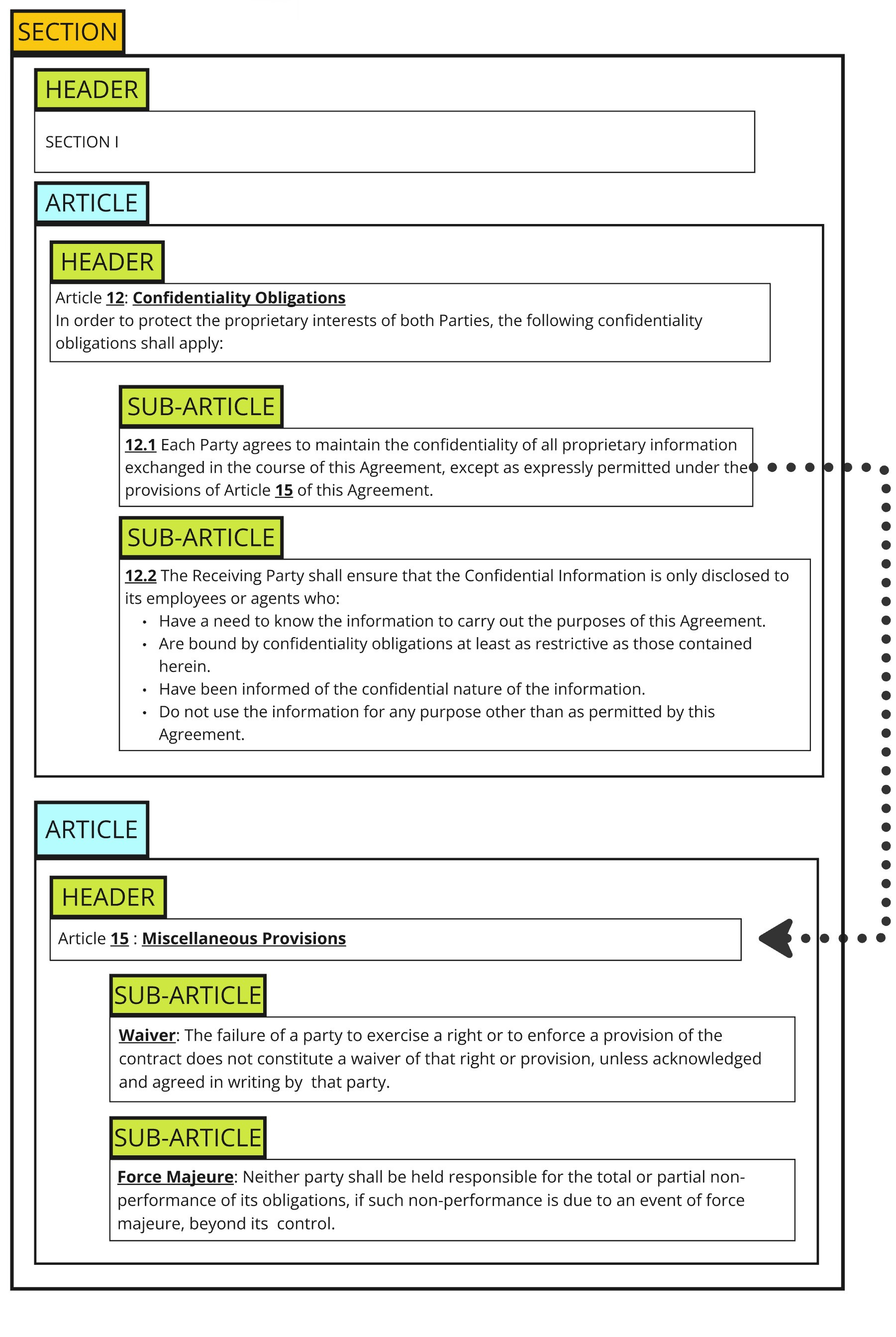
With later versions of GPT-4o, using few-shot prompting became viable, leading to better accuracy than our custom models, so we shifted approaches. The training data and annotation effort weren’t wasted, as they could be reused for evaluation and they informed our prompts, but the models themselves became obsolete. We also relaxed some of the initial constraints: for example, if the model does not split up the fourth or fifth sub-level (e.g. section 2.3.4.1) but kept it as a single chunk, in practice it is not a big deal since those sub-sections are likely very short and all closely related.
Reflections on Riding the LLM Wave
Building Copilex from late 2022 on-wards meant developing on shifting ground. ChatGPT had just launched. There was no Azure deployment for GPT models, no zero-retention data processing agreements, no way to use these capabilities to their fullest while making credible confidentiality promises to lawyers. The landscape changed dramatically over the following years.
GPT-4 couldn’t reliably extract complex document structure: it would hallucinate section numbers, produce malformed JSON, and lose track of hierarchical relationships in complex documents. But later models unlocked this and other use cases. Tasks that required elaborate prompting and multiple retries started to work fine without elaborate instructions. Now, don’t get me wrong, there is still plenty of engineering to make those models work better on complex tasks, but the baseline of what is possible has been raised significantly over time.
Some of that might sound obvious in hindsight, but it is difficult to predict which aspects of the models will improve first, and how long it will take! I believe that good software engineering is about allocating resources wisely, with a baseline of pragmatism to quickly deliver imperfect but working solutions, while strategically investing more effort and attention into things that are likely to stay difficult to solve for a while. This judgment - or “taste” as some call it - builds up over years of practical experience. With its breakneck pace, Generative AI certainly raises the stakes for good judgment.
In his famous “Bitter Lesson” piece, Prof. Richard Sutton observed that in AI research, general methods that leverage computation consistently outperform methods that leverage human knowledge. Clever hand-crafted approaches repeatedly lose to “just scale it up”. This suggests a change in mindset, going against what most engineers are trained for. The consequence is that we need to make bets on which problems to throw more compute at right now, absorbing higher operating costs in the short term with the belief that it will eventually become affordable to operate.
A recent example crystallized this for me. Anthropic’s Claude “docx skill“ is a very long prompt that explains Word’s internal XML structure and instructs the model to use Python libraries to manipulate it. Equipped with this skill, you can ask your AI agent to perform some operations on a Word document, and it will load that skill and use the instructions to perform the operation. It’s a slow, token-heavy approach, what you might call a “bazooka” solution. A year ago, the models wouldn’t have been smart enough to handle this. Today, it kind of works, although still expensive if you want to use it at scale! My Python-based solution is faster and cheaper for the specific task of making replacements in Word documents, but limited to that task and therefore a less general solution. It feel weird to replace precise and automatically code with trusting a non-deterministic model to “NEVER use unicode bullets”, “Always use WidthType.DXA” and the like. But it is increasingly clear that we are in the middle of a paradigm shift in how software is built.
Conclusion
Building AI products in a rapidly evolving landscape means coming up with creative solutions to work around the limitations and quirks of LLMs.
It’s a lesson in accepting that your best engineering today may become obsolete at an ever-faster pace, but also an incredible opportunity to build something new and innovative. Building something is easy; knowing what to build with care, and when to throw your money at a problem, is the hard part. Regardless of that, I’m hopeful that the expertise build along the way doesn’t become obsolete, but can be turbo-charged by even better AI assistants.